Take action
$1,600
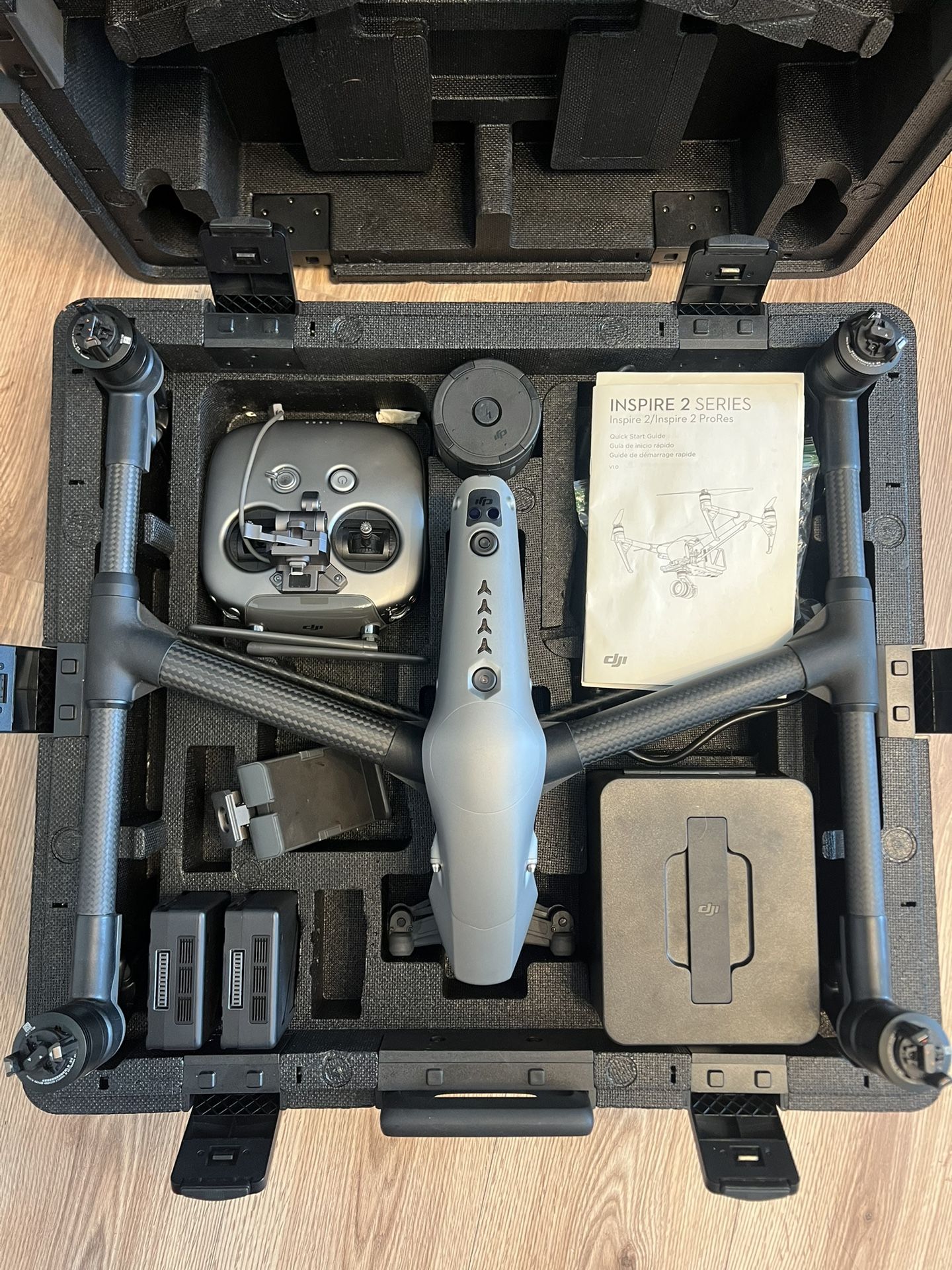
DJI inspire 2 drone
Last updated 8 days ago in Las Vegas, NV
Listed in categories:

Get a second opinion
Chat securely on the app

Additional images
Description
DJI INSPIRE 2 Everything works, includes 2 batteries, can be tested prior if serious about purchasing. DJI's magnesium-aluminum-clad Inspire 2 Quadcopter is a powerful cinematic and photographic tool. Combining the Inspire 2 with the separately available X4S and X5S gimbal cameras yields cinema-grade images, which can be recorded in high bit rates using H.264 and H.265 formats, or, in the case of the X5R, various flavors of Apple ProRes and CinemaDNG raw using the required licenses available from DJI. All the recording functionality is processed by the Inspire 2's CineCore 2.0 image processing engine. Not all the power to be found in the Inspire 2 is in the recording functionality. DJI beefed up the flight capabilities of the Inspire 2. Able to accelerate to 50 mph in 4 seconds and reach a top speed of 58 mph, the Inspire 2 can follow fast-moving subjects for dramatic sports and action footage. The flight prowess of the Inspire 2 doesn't come at the expense of battery life. With the two included LiPo batteries onboard, up to 27 minutes of flight time can be had on a full charge. Advanced obstacle avoidance has also made its way to the Inspire 2. Built into DJI's FlightAutonomy system, objects in front of, below, and above the quadcopter can be detected and avoided automatically. The Inspire 2 can even remember flight paths in case of an emergency return-to-home without GPS enabled. What's more, using the onboard 2-axis stabilized FPV camera, the pilot can navigate the Inspire 2 without being limited to the gimbal camera's field-of-view. Everything you need to set up your Inspire 2 is included. Two batteries with a charger, an all-new transmitter controller, extra propellers, a calibration plate, and a carrying case to store and transport everything. Advanced Obstacle Sensing Forward and downward vision systems enable the Inspire 2 to detect obstacles up to 30 meters ahead, allowing for protected flight at up to 34 mph at a controllable attitude angle of 25°. Upward-facing infrared sensors scan obstacles 16' above, adding protection when flying in enclosed spaces. Obstacle-sensing systems are active during normal flight, RTH, and all Intelligent Flight Modes. Spotlight Pro Spotlight Pro is a powerful tracking mode that allows even single pilots to capture complex, dramatic images. It uses advanced, visual-tracking algorithms to lock onto a subject during flight, regardless of the direction that the Inspire 2 flies, creating shots that would once have required a dedicated camera operator. If the gimbal comes close to reaching its rotation limits, the Inspire 2 itself will rotate in the same direction without affecting flight control or the shot being captured to free up gimbal movement. Spotlight Pro has two shooting modes: Quick Mode and Composition Mode. In Quick Mode, select an object to begin tracking. In Composition Mode, select the subject and the tracking position. When the subject enters the preset tracking position, press the shortcut to begin tracking. The gimbal can be moved during shooting for composition adjustments. Spotlight Pro is available in all Intelligent Flight Modes including ActiveTrack, TapFly, Waypoint and Point of Interest. TapFly The 2-axis onboard FPV camera separates the flight view from the main camera view, effectively giving the Inspire 2 a dedicated "tap-to-fly" camera. Tap a point onscreen in the FPV view to set a flight route and the Inspire 2 will automatically fly along that route, leaving the pilot to focus on gimbal movement. ActiveTrack The ActiveTrack Mode allows the Inspire 2 to recognize a range of objects, from people to bikes to cars to boats. Tracking profiles that can be adjusted based on the subject being tracked means greater tracking precision. Smart Return Home Forward and downward vision systems allow the Inspire 2 to create a real-time map of its flight route as it flies. If the video transmission system signal is lost and Smart Return Home is enabled, it is able to fly home along its original route and change to a straight line when it regains a signal. As it returns, it will use the primary camera to identify obstacles as far as 200m in front, allowing it to plan a safe route home. It is also able to reconnect more quickly after losing connection. Video Transmission System The Inspire 2 features DJI's Lightbridge technology. This iteration has an effective transmission distance of up to 4.3 miles (under ideal conditions) and is capable of delivering both 1080p/720p video as well as the FPV view to pilot and camera operator. Users can also switch between 2.4 GHz and 5.8 GHz control frequencies to avoid interference for greater signal stability. Master and Slave setups are also supported. The master controller can transmit an HD video signal to the slave controller up to 300' away without image quality loss. Broadcast Mode Broadcasters can broadcast direct from the Inspire 2 using its dedicated 1080i50 and 720p60 transmission signal. Aerial live
Details
Condition
Used (normal wear)
Type
Ready to fly drone
Brand
DJI Inspire 2
Item location map
Map is approximate to keep seller’s location private.