Take action
$100
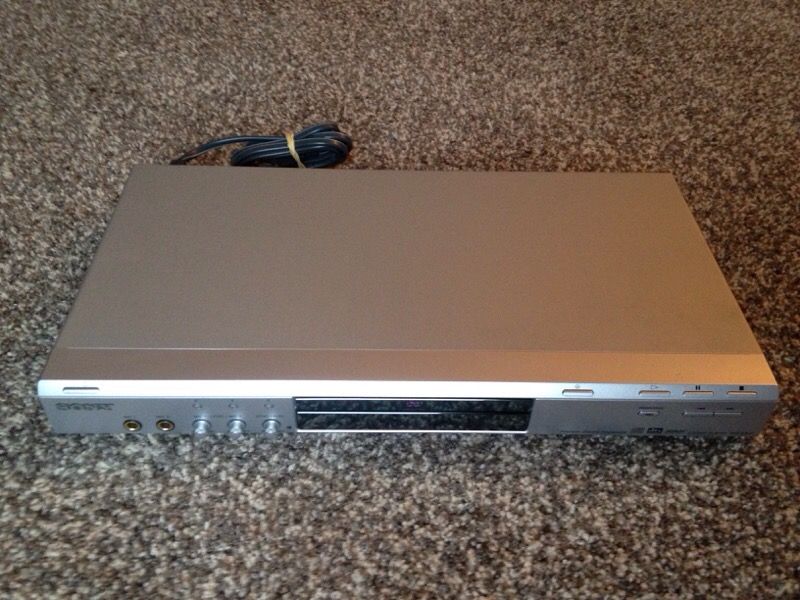
SONY DVP-K85P KARAOKE CD/DVD PLAYER - MINT CONDITION
Posted over 6 years ago in Bothell, WA
Listed in categories:

Get a second opinion
Chat securely on the app

Additional images
Description
SONY DVP-K85P KARAOKE CD/DVD PLAYER - MINT CONDITION - SERVICED & TESTED at NorthWest Audio ** CASH ONLY - Make an offer This unique DVD Player provides fully functional karaoke features like auto scoring and audience applause. The dual mic inputs allows for a duet with key and echo controls to ensure everyone is in harmony. Past generations of Precision Drive systems compensate for warped discs by moving the entire optical block, which took more time and limited the amount of correction possible. The new Precision Drive 3 system simplifies the process by moving the lens-instead of the entire optical block-for faster and more accurate error correction. Other DVD players detect image changes at the Scan line level-Sony's Precision Cinema Progressive (PCP) system detects them at the Pixel level. The picture is more faithful to the source-whether film or video-because separate, optimized algorithms are used to handle the differing Pixel behavior. Separate algorithms are also used to process the moving and still parts of an image, resulting in sharp backgrounds with moving objects that are virtually free from motion artifacts. Playing MP3 Music is easy. Just insert an MP3 encoded disc and press Menu. A blue screen pops up to Display your folders. Scroll down the list using the remote or front panel cursor control to select the folder you want. The green files screen pops up to show the files in the selected folder. Select(TM) the file you want to hear and you're done. Finding music couldn't be easier. RCA Audio Output - 1 Rear S-Video Output - 1 Rear Composite Video Output - 1 Rear Component Video (Y/Pb/Pr) Output - 1 Rear 2 Microphone Inputs Power Requirements - AC 120V, 60Hz Power Consumption in Operation - 10W CD, CD-R, CD-RW Playback dts Output MP3 Playback Dolby Digital Decoding Multiple Disc Resume Instant Replay Single Tray Type Background Graphics DVD (VR Mode) Playback with CPRM Precision Cinema Progressive Technology Precision Drive 3 DVD+R DL...
Details
Condition
Used (normal wear)
Item location map
Map is approximate to keep seller’s location private.