Take action
$55
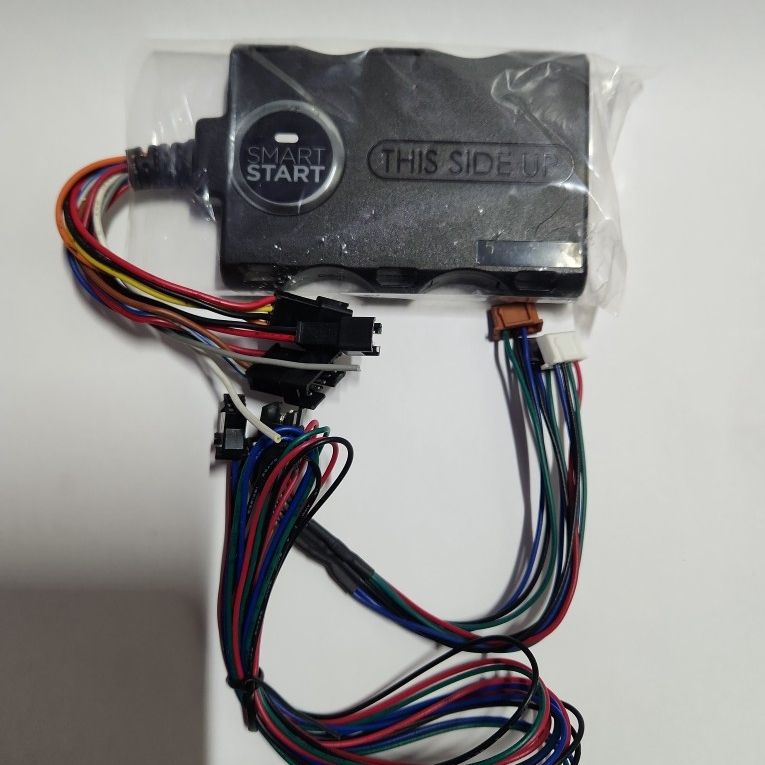
Python DSM200 SmartStart module for iPhone and other smartphones 2 Pieces
Posted in Fountain Valley, CA
Listed in categories:
Chat securely on the app

Description
2 dsm-200 included Overview: The DSM200 SmartStart module, made by Directed Electronics, allows you to operate specific functions of your Directed SmartStart-ready car security or remote start system from your Apple iPhone, iPad, or iPod touch. SmartStart technology is also compatible with some Blackberry and Android smartphones. The free SmartStart application can be downloaded to your iPhone, iPad, iPod touch, or compatible smartphone from the Apple iTunes App Store, Blackberry App World, or Android Market site, depending upon which brand you own. A service plan is required, but not included. Note: The iPod touch and iPad communicate with the vehicle via Wi-Fi. The vehicle's SmartStart module and the iPod touch/iPad must be on the same LAN. Compatibility: The SmartStart module is compatible with the following models of Directed Electronics Security and/or Remote Start Systems: Python: models 1401, 1601, 4104P, 580, 5204P, 592, 5704P, 5904P, 872, and 991 Clifford: models 1.2, 1.3x, 20.7x, 2.2, 3.3x, 50.7x, and 590.2x By transmitter type: 1-way SuperCode (Remote Start or Security System/Remote Start), Responder LE (RS or Sec/RS), Responder LC3 (RS or Sec/RS), Responder HD Multiple Vehicles: If you have SmartStart module installed in more than one vehicle, you can choose which vehicle to control right from your iPhone, iPad, iPod touch, or compatible Blackberry or Android smartphone. The Cars Screen lets you select which vehicle to control. Functionality: With SmartStart, you can use your iPhone/iPad/iPod touch to pre-warm your car's cabin in the winter, pre-cool it in the summer, lock/unlock the doors, arm/disarm your alarm, or find your car in the parking lot. Your vehicle responds exactly the same way as it does when using the alarm system's remote control, with audible and visual confirmations. On your iPhone, iPad, or iPod touch, you can perform the following commands, which appear as icons on the touchscreen: Lock: Locks the vehicle and sends a confirmation message. (Can also arm your vehicle's car alarm.) Unlock: Unlocks the vehicle and sends a confirmation message. (Can also disarm your vehicle's car alarm) SmartStart: Remote starts your vehicle and sends a confirmation message. The vehicle stays running for the programmed run time (default is 12 minutes). You can tap the icon again to turn off the vehicle. Trunk: Tapping the icon once opens a dialog box, asking you to confirm the command (Yes/No). If you tap "Yes" the trunk opens the trunk and a confirmation message is sent. Panic: Activates the panic mode for 30 seconds. You can tap the icon again to turn off. (This feature is used to attract attention if you're in a threatening position. It can also be used as a car finder.) Menu Bar/Screens: At the bottom of the SmartStart app screen, the menu bar provides buttons to open any of the four screens: Home: The Home screen is the default screen, and gives you access to all of the remote commands: Lock, Unlock, SmartStart, Trunk, and Panic. Alerts: The Alerts provides notifications from the system. The number of new and un-cleared alerts are indicated by a red circle. The notifications can be in the form of alarms, communication issues, or updates to your service plan. Cars: The Cars screen allows you to control multiple vehicles if you have a compatible security/remote start system installed in more than one vehicle. Settings: The Settings screen allows you to control your SmartStart login. It indicates your user name, and allows you to change password, or request a forgotten password. Virtually Unlimited Range: SmartStart works over the 3G cellular network or over Wi-Fi, giving you virtually unlimited range anywhere in the United States. As long as your vehicle is in range of a GSM cellular signal and your phone has a 3G signal, SmartStart will work. When using Wi-Fi connection, both the vehicle and device must be connected to the same LAN. SmartStart Service Plans: Once you have installed the DSM200 SmartStart Module, you will need to subscribe to a SmartStart Service Plan. As of November 2013, the SmartStart Secure 1-year plan is $69.49, and the 3-year plan is $168.99. Included at no charge with the SmartStart Service Plan is membership in the SmartStart Motor Club, with free 24/7/365 roadside assistance.
Details
Condition
Reconditioned/Certified
Placement On Vehicle
Alarm
Brand
Directed
Item location map
Map is approximate to keep seller’s location private.
Related searches
- Honda civic
- Toyota tacoma
- Toyota
- Honda
- Truck
- Bmw
- Lexus
- Chevy silverado
- Ford F-150
- Mustang
- Boat
- Toyota Corolla
- Rv
- Ford ranger
- Jeep wrangler
- Chevy Camaro
- Chevy Tahoe
- GMC Sierra
- Dirt bike
- Rims
- Jeep
- Honda crv
- Toyota Tundra
- Chevy
- Kayak
- Toyota 4Runner
- Harley davidson
- Tesla
- Camper
- Nissan Frontier
- Subaru
- Ford
- Toyota Prius
- Toyota RAV4
- Audi
- Nissan
- Toyota Sienna
- Ford F-250
- Tires
- Ram 1500
- Toyota Highlander
- Chevy Suburban
- Ford explorer
- Mazda
- Honda Odyssey
- Nissan altima
- Cadillac Escalade
- Dump trailer
- Kia
- Fishing boat
- Chevy impala
- Hyundai
- Dodge
- Trailers
- Diesel
- Toyota yaris
- Chevy parts
- Honda motorcycles
- Jeep parts
- Camper van