Take action
$150
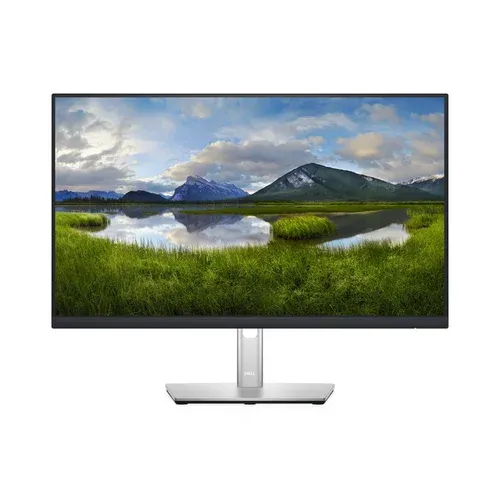
*Brand New In Box* Dell P2422H 24” Monitor (4x $150 EACH)
Last updated 8 days ago in San Tan Valley, AZ
Listed in categories:

Chat securely on the app

Additional images
Description
* Mor photos coming soon!!! My friend is getting rid of her extra computer equipment that was sent but not needed, from her work from home Job. Everything is brand new in box. We have 4 monitors brand new in box $150 for EACH* Basic Overview • Screen size: 23.8 inches (marketed as 24”) • Resolution: Full HD 1920 × 1080 • Refresh rate: 60 Hz • Panel type: IPS (In-Plane Switching) • Aspect ratio: 16:9 • Typical brightness: 250 nits • Contrast ratio: 1000:1 • Response time: 5 ms (fast mode) / 8 ms normal  Best for: • Office work • spreadsheets / documents • coding • multi-monitor setups Not really designed for gaming or HDR media. ⸻ Display & Image Quality Panel technology: IPS • Wide viewing angles: 178° horizontal / vertical • Colors stay accurate even when viewed from the side.  Color performance • 99% sRGB coverage • 16.7 million colors • Good for general design and productivity tasks.  Pixel density • ~93 PPI • Standard clarity for 24” 1080p monitors.  Screen finish • Anti-glare matte coating • Reduces reflections in office environments.  ⸻ Eye Comfort Features Dell built this monitor for long workdays. ComfortView Plus • Reduces blue-light exposure without affecting color accuracy.  Flicker-free backlight • Helps reduce eye strain during extended use.  ⸻ Ports & Connectivity Ports on the monitor: • 1 × HDMI 1.4 • 1 × DisplayPort 1.2 • 1 × VGA • 1 × USB-B upstream • 4 × USB-A downstream (USB hub)  This allows you to: • connect multiple computers • plug in keyboard/mouse through the monitor • use the monitor as a USB hub. ⸻ Ergonomics & Adjustability One of the big advantages of the P-series. Adjustments: • Height adjustment: 150 mm (5.9”) • Tilt: −5° to +21° • Swivel: −45° to +45° • Pivot: 90° (portrait mode)  This makes it very good for: • coding • document editing • dual monitor setups. ⸻ Physical Dimensions With stand: • Width: 21.2 in • Height: 19.5 in • Depth: 7.1 in Weight: • ~7.5 lb without stand  Mounting: • VESA 100 × 100 mm compatible. ⸻ Design Key design elements: • 3-sided ultra-thin bezels • Cable management built into stand • Small footprint base • Works well in dual or triple monitor setups.  ⸻ Power Consumption • Typical: ~12W • Standby: ~0.3W  Very energy efficient. ⸻ What Comes in the Box Typical package includes: • Monitor with stand • Power cable • DisplayPort cable • USB upstream cable • Setup documentation 
Details
Condition
New
Item location map
Map is approximate to keep seller’s location private.