Take action
$550
Mint. 14" Apple MacBook Pro 32GB Ram 512GB SSD
Last updated about 4 hours ago in Pompano Beach, FL
Listed in categories:

Chat securely on the app

Additional images
Description
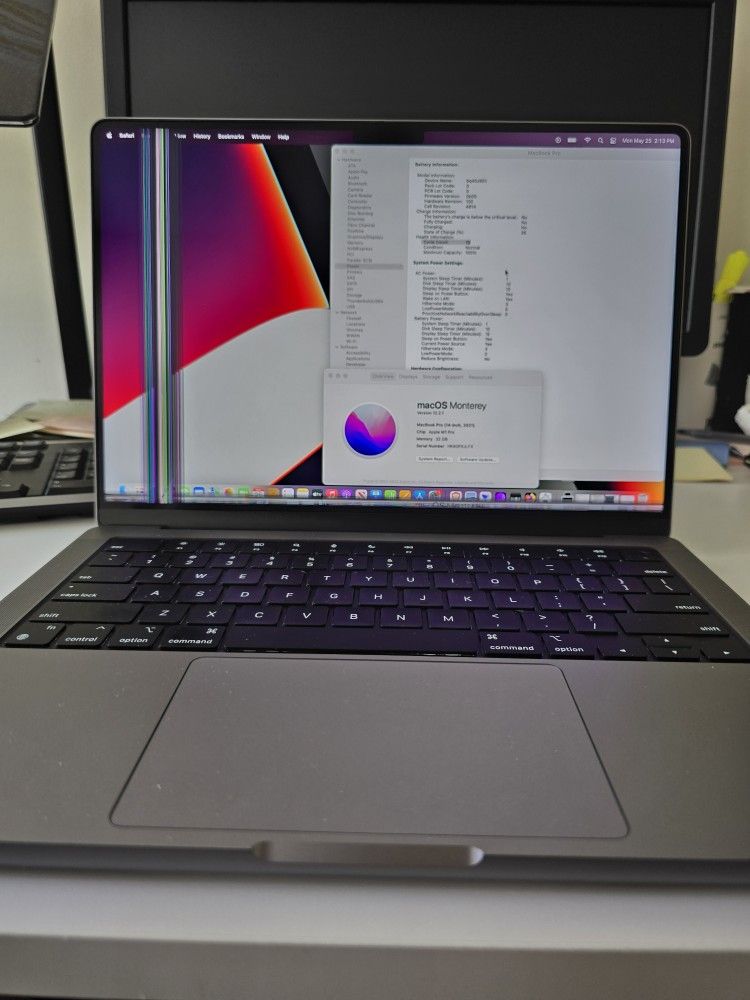
Selling a barely used Apple laptop. The original Apple purchasing price for the new M1 chip for a MacBook Pro in 2021/2022 for this model A2442 M1 Pro was $2,399 + taxes. My lost your gain. When I say barely used, i literally mean barely used as I have another primary laptop. I bought this for traveling purposes as it's more compact than my primary. Anyone who is familiar with Apple laptops know battery life or battery health is a tell tell on the usage, and the battery cycle count on this laptop is just 19 with a 100% maximum capacity battery life remaining. See pictures taken on 5/25/26 One little hiccup, when I went to closed the screen one night, distracted, I closed the screen with a sticky pad on the keyboard and while closing the sticky pad pressed against the screen hence now you see those lines on the first two pics. New update: 5/26/2026. I deleted my personal data from the hard-drive and I reset the computer back to factory settings but now the screen faintly turns on and you can't see anything unless it's connected to a monitor or a TV. The screen will have to be replaced, or you may get away by just doing these steps I found online that can possibly fix the issue. By a subscriber called Tips 2 fix. But it requires opening the back cover. See a YouTube video called " MacBook pro black screen of death - 2019 (working method)". it's a 7min and 48sec short clip. I don't have the tools to remove the backcover. The physical conditions of this M1 MacBook Pro is without a scratch, without any dents, without any scuffs, it's prestine like right out of the box. So, it goes for the charger without a single scratch. Again, barely used i just accidentally closed the screen on a sticky note pad and pressed it against the screen. Smh I believe what im asking for is reasonable considering the physical condition on the laptop is like... Perfect, extreme rare for the low usage on it with just 19 cycle on charges and a 100% battery life remaining.
Details
Condition
Used (normal wear)
Screen Size
14-14.9 in
Model
MacBook Pro A2442
Type
Notebook/Laptop
Additional details
RAM Size
20-39 GB
Brand
Apple
Operating System
macOS Monterey version 12.2.1
Item location map
Map is approximate to keep seller’s location private.